
For years, the tech world watched as Silicon Valley entered an AI arms race, with many wondering if Apple had missed the train. In late 2024 and throughout 2025, that narrative shifted dramatically. Today, in 2026, the data confirms it: Apple has successfully deployed on-device AI to over 2.2 billion active devices globally.
This wasn’t just a late entry; it was a tactical masterstroke. By introducing Apple Intelligence, the tech giant didn’t just give users a smarter Siri; it handed developers a native, privacy-first, and highly optimized neural framework that lives in the pocket of almost every high-spending consumer on the planet.
But for the developer community, this represents a fundamental “re-learning” phase. We are moving away from the era of “AI as a feature” toward a world of “Agentic UI.” If you aren’t optimizing your apps for Apple Intelligence, your software isn’t just outdated—it’s invisible to the new iOS orchestration layer. Here is what this revolution actually means for your roadmap.
1. App Intents: The New Language of iOS Development
The most significant search query on Google regarding this topic is: “How do I integrate my app with Apple Intelligence?” The answer lies in App Intents.
In the old days, a developer built an app as a destination. You wanted the user to open your app and click buttons. In the era of Apple Intelligence, your app is becoming a “toolkit” for Siri and system-wide agents. Apple Intelligence uses an “on-device semantic index” to understand what your app does and when it’s relevant.
Transitioning to an Action-Oriented Architecture
To play in this ecosystem, developers must define “Actions” via the App Intents framework. Whether you’re building a finance app or a grocery list, you need to expose your core features so the system can call them autonomously.
- Example: Instead of a user opening a flight-booking app to find their gate, Apple Intelligence scans the app’s exposed intents to proactively tell the user their gate through a Dynamic Island notification or a Siri voice prompt.
Developers who master the Semantic Index will find their apps used more frequently through system-level suggestions than through manual taps.
2. Privacy as a Performance Metric: Private Cloud Compute (PCC)
One of the major “Search Intents” for developers is security. “Is Apple Intelligence safe for enterprise data?” This is where Apple’s Private Cloud Compute (PCC) becomes a game-changer for the industry.
Previously, developers faced a brutal trade-off:
- Run a tiny model on the device (Fast, but limited reasoning).
- Send data to a cloud API like OpenAI (Powerful, but massive privacy risks and costs).
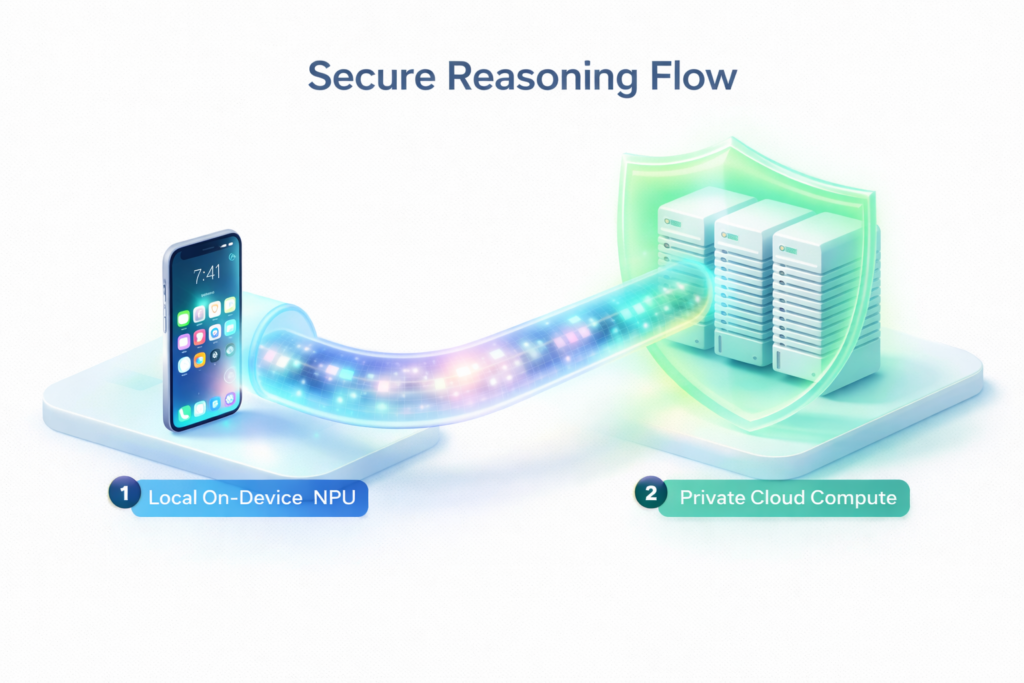
Apple Intelligence solves this with a hybrid approach. If a task is too complex for the iPhone’s NPU (Neural Processing Unit), it shifts to PCC—a server-side infrastructure running on Apple Silicon. For the developer, this means you can build complex AI features without worrying about managing your own expensive and high-risk GPU clusters. Apple has effectively democratized “state-of-the-art” inference while providing an audit-trail that guarantees the data is deleted immediately after the task is performed.
3. The End of Generic UX: System-Wide Writing Tools and Image Playground
Apple is taking the “boilerplate” features of AI—like summarizing text, proofreading, and image generation—and baking them directly into the operating system.
As a developer, this means you no longer need to build these features yourself. Through standard UI components in SwiftUI, your app can inherit Apple Intelligence capabilities automatically.
- Writing Tools: Any standard text field now gets the ability to summarize, rewrite, or adjust the tone of the user’s input.
- Image Playground API: If you are building a messaging or social app, you can call the Image Playground API to let users create stickers or sketches without you writing a single line of generative model logic.
This allows developers to stop reinventing the wheel and start focusing on the specialized business logic that makes their app unique.
4. Xcode 16 and Beyond: AI-Driven Development for the Devs
It’s not just about what you build; it’s about how you build it. Apple’s entry into AI has also transformed the IDE (Integrated Development Environment).
The new Xcode Predictive Code Completion is not just an autocomplete tool. It is fine-tuned specifically for Swift and Apple’s frameworks. Because the model understands the specific context of UIKit, SwiftUI, and Combine, it produces significantly fewer “hallucinations” than generic AI coding assistants.
For junior developers, this is an incredible accelerant. For senior developers, it means the end of hunting through documentation for a specific API syntax. You can now describe the UI component you want in plain English, and Xcode will generate the Swift code optimized for the latest SDKs.
5. Strategic ROI: Why Local Models Win Over API Calls
One of the most frequent questions from startup founders in 2026 is: “Why use Apple Intelligence instead of just calling the ChatGPT API?”
The answer is three-fold: Cost, Latency, and Trust.
- Cost: API tokens for models like GPT-4o add up. Apple Intelligence is free for the developer. You are utilizing the consumer’s own hardware to perform the “heavy lifting,” which effectively removes your “AI overhead” from the profit-and-loss statement.
- Latency: Round-trips to a server in Virginia take time. Local models are near-instant, providing a fluid experience that feels like “native magic.”
- Trust: Apple’s “AI” brand is centered on being a “personal assistant” rather than a “world-replacing oracle.” Users are more likely to grant your app access to their photos or messages if they know the data stays within the Apple security sandbox.
Key Takeaways for Developers in 2026:
- Implement App Intents Immediately: Your app must be searchable and “actionable” by the system semantic index to remain relevant.
- Offload AI Features to macOS/iOS: Stop paying for generic generative API calls; use the Writing Tools and Image Playground APIs instead.
- Master Private Cloud Compute: Use Apple’s PCC for high-security, high-power reasoning tasks to gain user trust.
- Shift to Agentic UI: Think of your app not as a series of screens, but as a series of functions that a smart agent (Siri) can use to solve problems.
- Xcode Optimization: Lean into Swift-specific AI coding tools in Xcode to decrease development time and increase code reliability.
Leave a Reply